
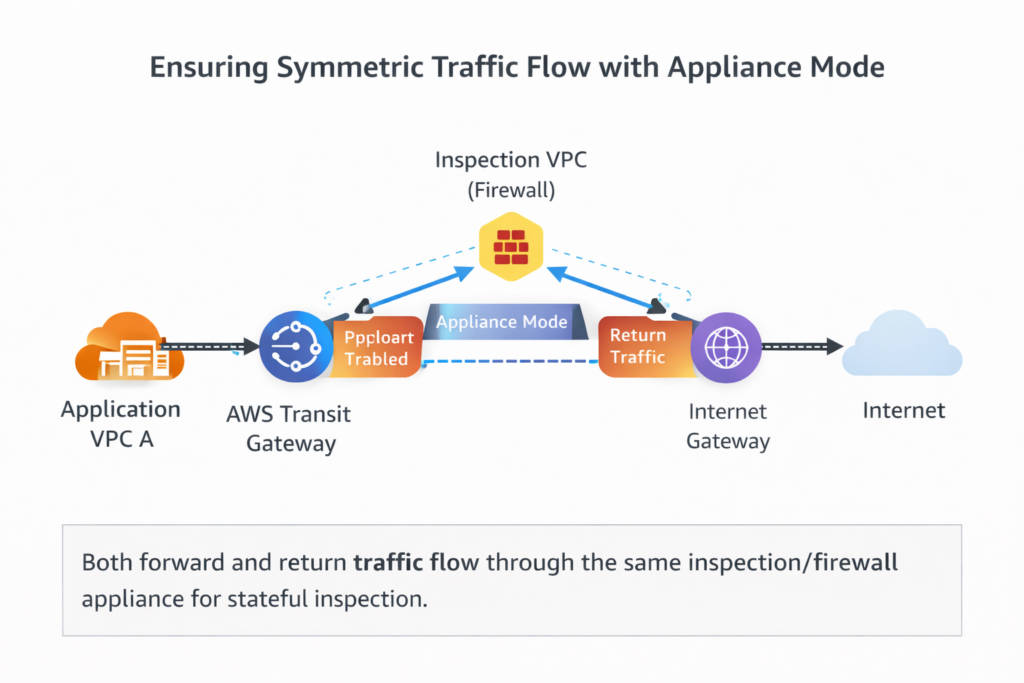
Many organizations deploy network security appliances in AWS to inspect traffic between networks.
These appliances can include:
- firewalls
- intrusion detection systems
- deep packet inspection tools
However, when traffic flows through these appliances in AWS, a common problem appears: asymmetric routing.
This means the traffic goes through the inspection appliance in one direction but returns through a different path.
This can break stateful inspection and cause connections to fail.
To solve this problem, AWS provides Appliance Mode in AWS Transit Gateway.
Appliance Mode ensures that traffic flows symmetrically through the same inspection appliance, allowing stateful devices to work correctly.
The Problem: Asymmetric Routing
When using a centralized inspection architecture with a Transit Gateway, traffic may take different paths depending on routing decisions.
Example:
VPC A → Transit Gateway → Inspection VPC → Internet
Internet → Transit Gateway → VPC A
But sometimes the return traffic may bypass the inspection appliance.
Example:
VPC A → Firewall → Internet
Internet → Transit Gateway → VPC A
This creates asymmetric routing.
Stateful appliances rely on seeing both directions of the traffic.
If they do not, the connection may be dropped.
What is Appliance Mode?
Appliance Mode is a feature of Transit Gateway VPC attachments.
When enabled, it ensures that traffic flows through the same Availability Zone and appliance instance in both directions.
This maintains symmetrical traffic flow, which is required for stateful inspection.
Without Appliance Mode, the Transit Gateway may load-balance traffic across different Availability Zones.
Architecture Overview
A common architecture includes:
- multiple application VPCs
- a centralized inspection VPC
- a Transit Gateway connecting everything
Example architecture:
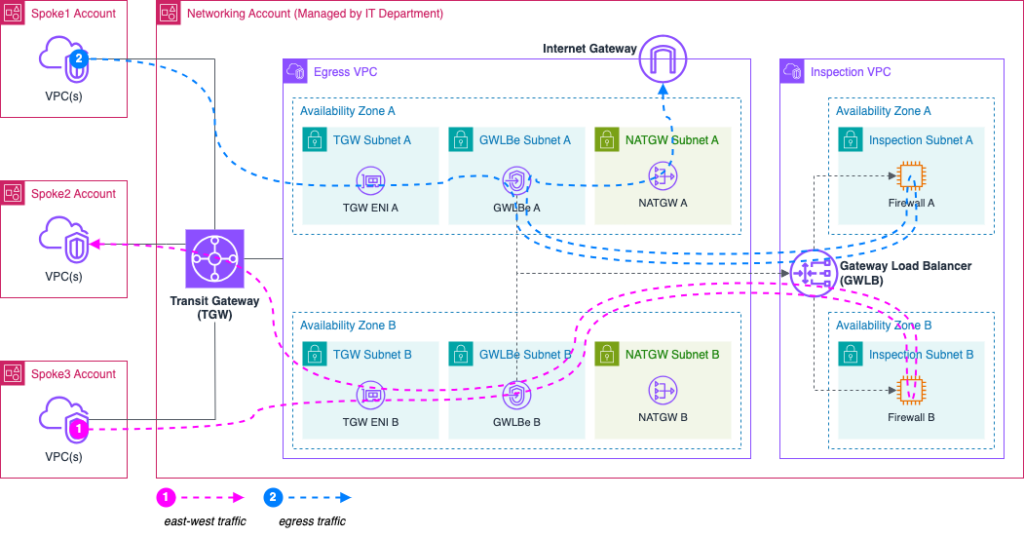
Image source: AWS Architecture blog
Traffic from application VPCs is routed through the inspection VPC before reaching the internet.
Appliance Mode ensures that both directions of traffic use the same firewall instance.
Common Use Cases
Centralized Firewall Architecture
Organizations often deploy third-party firewalls in a dedicated inspection VPC.
Examples include:
- Palo Alto
- Fortinet
- Check Point
These appliances inspect traffic between VPCs and external networks.
Appliance Mode ensures traffic returns through the same firewall.
East-West Traffic Inspection
Companies sometimes inspect traffic between internal VPCs.
Example:
VPC A → Firewall → VPC B
Without Appliance Mode, the return path might bypass the firewall.
Appliance Mode guarantees consistent inspection.
Compliance and Security Monitoring
Some industries require deep traffic inspection.
Examples include:
- finance
- healthcare
- government
Appliance Mode ensures that inspection devices can maintain session state and policy enforcement.
How to Enable Appliance Mode
Appliance Mode is enabled on the Transit Gateway VPC attachment.
Step 1
Open the AWS console and go to Transit Gateway.
Step 2
Select the VPC attachment connected to your inspection VPC.
Step 3
Edit the attachment settings.
Enable:
Appliance Mode Support
Step 4
Save the configuration.
Once enabled, Transit Gateway ensures that traffic from a source uses the same Availability Zone for both directions.
Best Practices
Use multiple firewall instances across Availability Zones for high availability
Ensure subnet and routing alignment per Availability Zone to fully benefit from Appliance Mode
Use consistent routing policies to ensure traffic is always sent through the inspection VPC
Monitor traffic flows using tools such as:
Amazon CloudWatch
AWS VPC Flow Logs
Conclusion
When deploying network inspection architectures in AWS, asymmetric routing can break security appliances and cause unexpected connectivity issues.
Appliance Mode in AWS Transit Gateway solves this problem by ensuring symmetric traffic flow through inspection appliances.
For organizations implementing centralized security inspection, enabling Appliance Mode is often a critical step in building a reliable and secure AWS network architecture.
Leave a Reply