
For many years, companies have used MPLS networks to connect their offices and datacenters. MPLS can provide stable connectivity, but it also has some major downsides:
- It is expensive
- It takes time to deploy new locations
- It is not always flexible
Today, many companies already have connections to the cloud using site-to-site VPNs.
A feature of AWS Site-to-Site VPN called SiteLink allows organizations to use the AWS global network as a backbone to connect their locations.
Instead of sending traffic across the public internet or expensive MPLS circuits, companies can send traffic through the AWS private global network.
This approach can:
- simplify network architecture
- reduce costs
- improve connectivity between locations
In this article we will look at:
- what AWS SiteLink is
- how it works
- common use cases
- how to configure it step by step
What is AWS SiteLink?
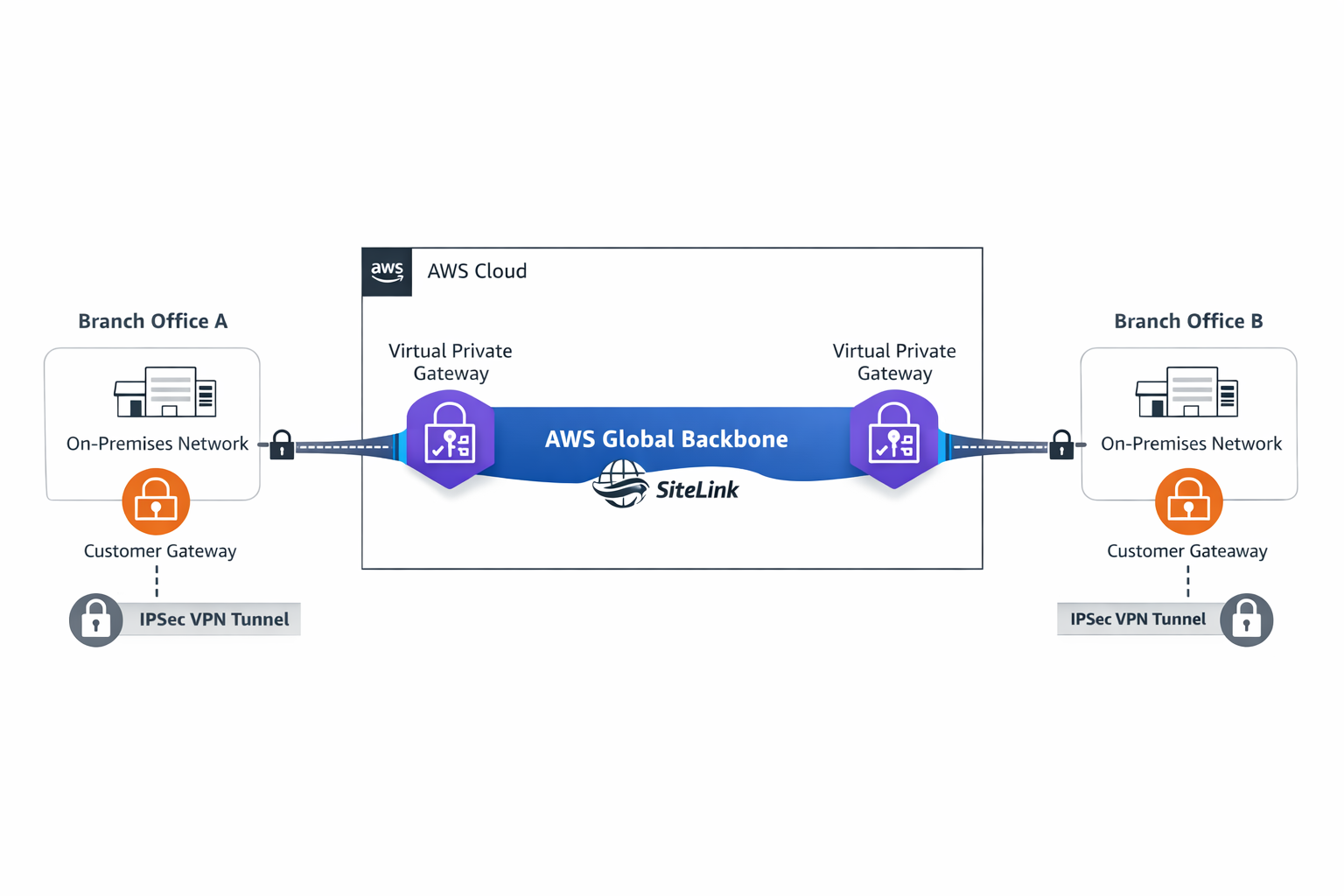
AWS SiteLink allows multiple on-premises locations connected with VPN to communicate with each other through the AWS global network.
Normally, when two offices use a VPN connection with AWS, traffic flows like this:
Branch A → AWS VPC → Branch B
Traffic goes into the VPC before reaching the other office.
With SiteLink enabled, traffic can go directly between the offices through the AWS backbone:
Branch A → AWS Global Network → Branch B
This means:
- traffic does not need to pass through workloads in the VPC
- AWS acts as a private global network between your sites
Architecture Overview
A basic SiteLink architecture includes three main components:
- a Customer Gateway (your on-premises router or firewall)
- a Virtual Private Gateway in AWS
- VPN tunnels connecting the site to AWS
Once SiteLink is enabled, AWS allows traffic between the connected VPN locations.
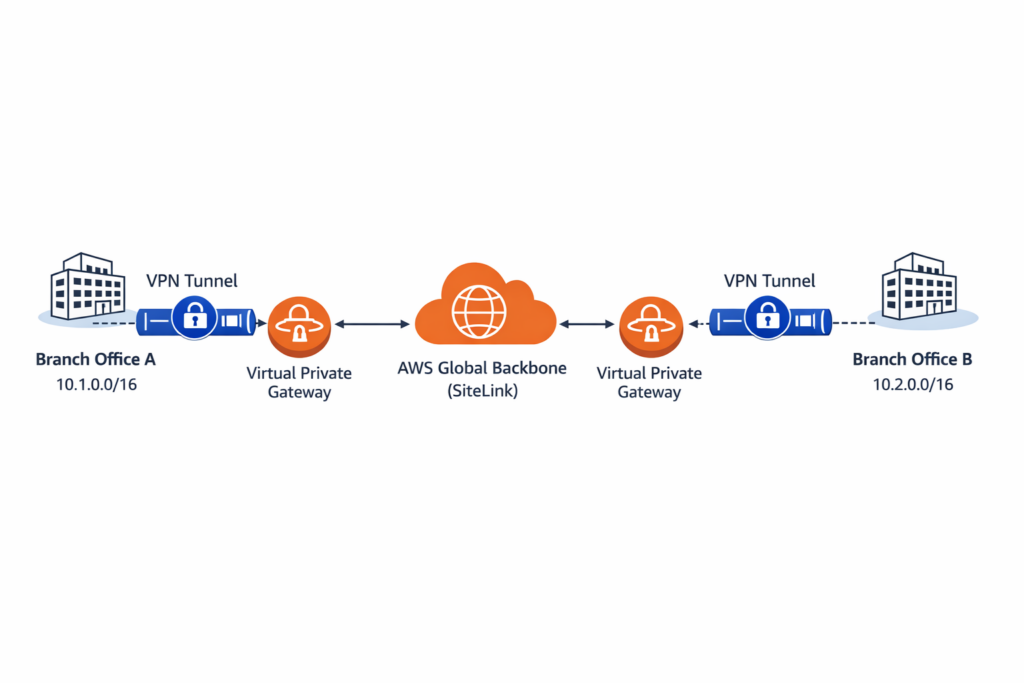
In this model, AWS becomes the transport network between offices.
How Routing Works
Routing usually uses BGP dynamic routing.
Each office advertises its network ranges to AWS.
Example:
Office A → 10.1.0.0/16
Office B → 10.2.0.0/16
Office C → 10.3.0.0/16
AWS shares these routes across the VPN connections.
When Office A needs to communicate with Office B, AWS forwards the traffic through its backbone network.
Real Use Cases
1. Connecting Multiple Branch Offices
Companies often have offices in different cities or countries.
Example:
- New York office
- London office
- Tokyo office
Each office connects to AWS using VPN.
With SiteLink enabled, these offices can communicate with each other through the AWS network instead of the public internet.
Benefits include:
- simpler network design
- more predictable connectivity
- easier expansion to new locations
2. Datacenter Interconnect
Many companies operate more than one datacenter.
Traditionally, they connect datacenters using MPLS circuits:
Datacenter A → MPLS → Datacenter B
Using SiteLink, companies can instead do:
Datacenter A → VPN → AWS → VPN → Datacenter B
AWS acts as the backbone network between the datacenters.
3. Hybrid Cloud Environments
During cloud migration, companies often run systems in multiple places:
- existing datacenters
- branch offices
- workloads in AWS
SiteLink allows these locations to communicate efficiently while the migration is happening.
Configuring AWS SiteLink
This section shows a simple example of how to configure SiteLink between two sites.
Lab architecture
Datacenter A
10.10.0.0/16
      │
      │ VPN
      │
AWS Virtual Private Gateway
      │
AWS Backbone (SiteLink)
      │
AWS Virtual Private Gateway
      │
      │ VPN
      │
Datacenter B
10.20.0.0/16
Step 1 – Create a Virtual Private Gateway
In the AWS console:
VPC → Virtual Private Gateways → Create
After creating the gateway, attach it to a VPC.
Step 2 – Create a Customer Gateway
Next, define your on-premises router.
Go to:
VPC → Customer Gateways → Create
Provide:
- the public IP address of the router
- the BGP ASN
Example:
Public IP: 203.0.113.10
BGP ASN: 65010
Step 3 – Create the VPN Connection
Create a Site-to-Site VPN connection.
VPC → Site-to-Site VPN → Create
Select:
- the Virtual Private Gateway
- the Customer Gateway
Choose Dynamic Routing (BGP).
Step 4 – Enable SiteLink
After the VPN is created, edit the VPN configuration.
Enable the option:
Enable SiteLink
This allows AWS to route traffic directly between VPN connections.
Step 5 – Configure Routing
Configure BGP on your router and advertise your internal networks.
Example:
Datacenter A → 10.10.0.0/16
Datacenter B → 10.20.0.0/16
AWS will distribute these routes to other SiteLink connections.
Step 6 – Test Connectivity
Test connectivity between the two locations.
Example commands:
ping 10.20.1.10
or
traceroute 10.20.1.10
You can monitor VPN status and metrics using Amazon CloudWatch.
Why AWS SiteLink Is Often Underused
Even though SiteLink is powerful, many companies do not use it.
This usually happens because:
Many engineers simply do not know the feature exists.
Companies are used to traditional networking models like MPLS.
Some teams think AWS networking is only for connecting cloud workloads.
In reality, AWS has one of the largest private networks in the world, and it can be used as part of your enterprise network.
Conclusion
AWS SiteLink allows companies to use the AWS global network as a private backbone between offices and datacenters.
With this approach, organizations can:
- simplify hybrid networking
- reduce dependence on MPLS networks
- improve connectivity between locations
For companies operating across different regions, SiteLink provides a flexible way to build a modern global network using AWS infrastructure.
Leave a Reply