
Understanding how Amazon ECS microservices find each other, communicate over private networks, and respond when services fail.
Introduction
Getting microservices running on Amazon ECS is only part of the job.
Once they’re running, they need a way to talk to each other.
Imagine two microservices: Orders and Payments. Whenever a customer places an order, Orders needs to call Payments.
In a traditional setup, we might give Orders a fixed IP address for the Payments server. With containers, that approach quickly gets awkward.
ECS tasks come and go. They can stop, be replaced, or scale out, and a new task may get a different private IP address.
So how does Orders know where Payments is running?
And what happens if one Payments task fails—or the whole service goes offline?
To find out, I built a small lab with AWS Fargate and AWS Cloud Map. I tested DNS resolution, HTTP connectivity, scaling, task failures, and recovery.
One distinction stood out:
Service discovery tells an application where a service can be reached. It does not guarantee that the service is available or that requests will be distributed evenly.
Let’s walk through the setup and see what happened.
1. Understanding the Lab Architecture
The lab has two microservices running on Amazon ECS with AWS Fargate.
Orders Service
- Runs a Python application on port 4000.
- Acts as the client in our experiments.
- Calls the Payments service through HTTP.
- Uses the hostname payments.lab.internal rather than a hardcoded IP address.
Payments Service
- Runs a Python application on port 5000.
- Exposes a /payment endpoint.
- Returns information about the responding container, including its private IP address.
- Can be scaled to multiple ECS tasks.
Both services run in private subnets within the same VPC.
For service discovery, I configured AWS Cloud Map with a private DNS namespace called lab.internal.
The Payments service is registered under the name:
payments.lab.internal
The Orders application uses the following URL:
http://payments.lab.internal:5000/payment
The architecture
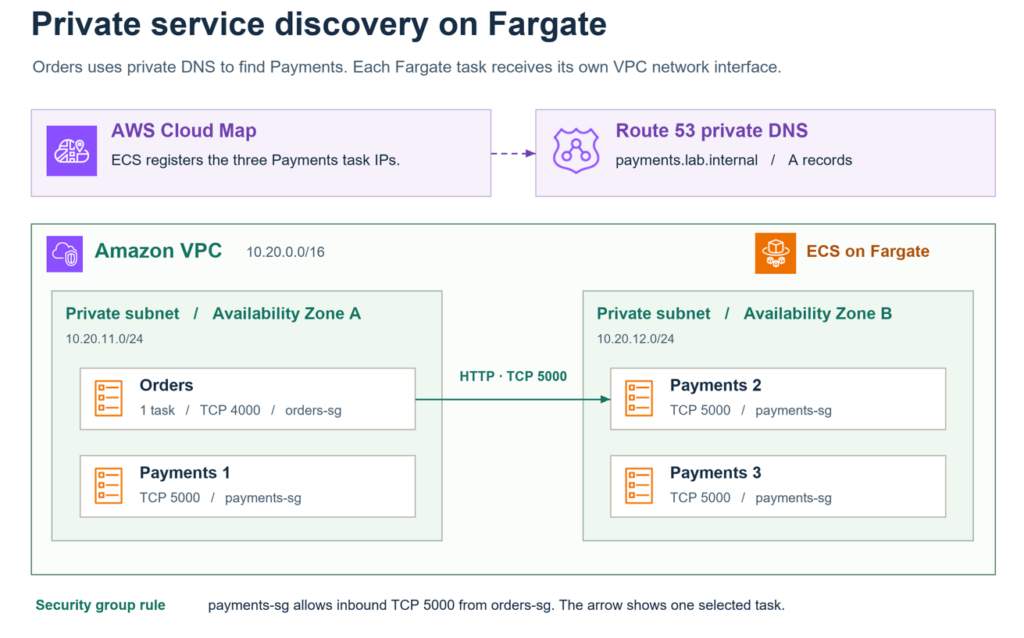
Example endpoint addresses captured during the scaling experiment. ECS task addresses changed during subsequent experiments.
Orders doesn’t need to know each Payments task’s private IP address ahead of time.
It uses a DNS name instead, which can resolve to the addresses of registered Payments tasks.
2. How ECS Task Networking Works
Before getting into Cloud Map, it helps to look at how the tasks connect to the network.
The lab uses awsvpc network mode.
With this network mode, each Fargate task receives its own elastic network interface (ENI) and private IP address from the subnet where it runs.
Rather than sharing a single host-level IP address, each task has its own address.
Each task becomes directly addressable within the VPC, subject to the configured network routes and security groups.
During the experiment, the Payments tasks had these private IP addresses:
| Payments task | Private IP |
| Task 1 | 172.31.101.139 |
| Task 2 | 172.31.100.131 |
| Task 3 | 172.31.101.133 |
Because the tasks are in private subnets, they communicate through private VPC networking.
I configured the Payments security group to allow inbound TCP traffic on port 5000 from the Orders security group.
That keeps the access rule focused.
Instead of opening port 5000 to an entire subnet or the internet, we can allow traffic from the service that actually needs it.
What happens during an HTTP request?
An Orders-to-Payments request comes down to four steps:
- Orders resolves payments.lab.internal using DNS.
- DNS returns the private IP addresses associated with registered Payments tasks.
- The HTTP client selects an address and establishes a TCP connection to port 5000.
- The Payments application processes the request and returns an HTTP response.
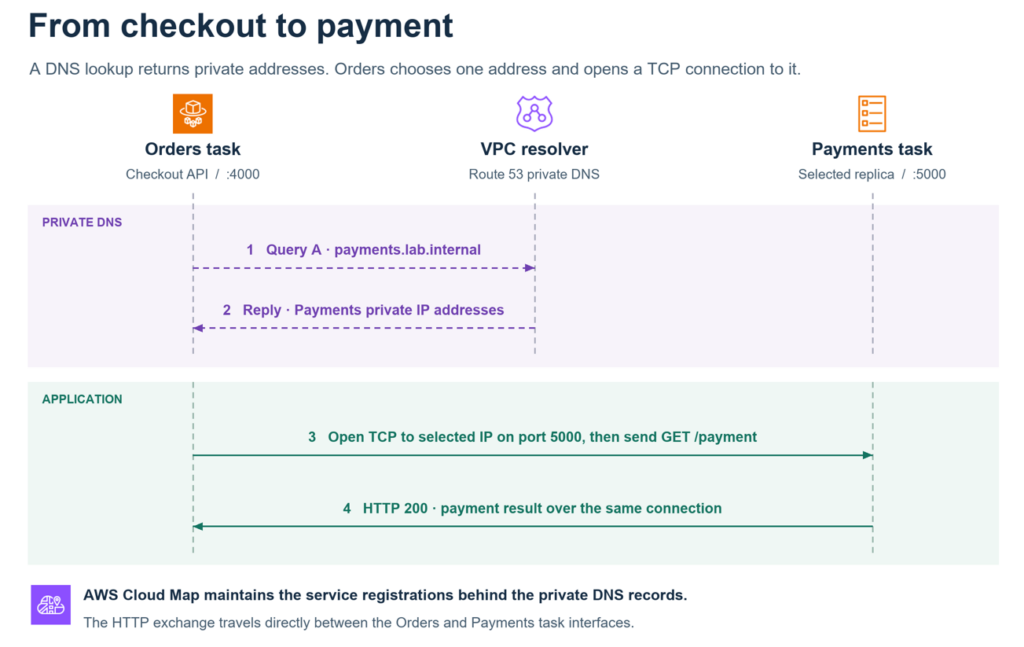
Cloud Map helps Orders find Payments; it doesn’t proxy the HTTP request.
The request itself travels directly between the ECS tasks over the VPC network.
3. Introducing AWS Cloud Map
AWS Cloud Map is a service discovery solution that allows applications to discover resources using names instead of fixed addresses.
Here’s the Cloud Map configuration I used:
| Configuration | Value |
| Private DNS namespace | lab.internal |
| Cloud Map service | payments |
| Service hostname | payments.lab.internal |
| DNS record type | A |
| Routing policy | Multivalue |
| DNS TTL | 10 seconds |
The ECS Payments service was integrated with Cloud Map.
When Payments tasks started, ECS registered their network information with Cloud Map.
When tasks stopped, ECS deregistered their instances.
This allows the DNS records associated with the service to change as the ECS environment changes.
There’s a catch, though.
A 10-second DNS TTL doesn’t mean every application will pick up a change within exactly 10 seconds.
That also depends on how resolvers, operating systems, and application libraries cache DNS results.
Keep that in mind when we get to the failure tests.
4. Experiment One: DNS Resolution and Direct Connectivity
I started with a simple check.
Could Orders resolve the Payments hostname and reach each Payments task?
From inside the Orders container, I used Python to look up the hostname:
import socket
hostname = “payments.lab.internal”
addresses = socket.gethostbyname_ex(hostname)[2]
print(addresses)
After scaling Payments to three tasks, DNS returned three private IP addresses.
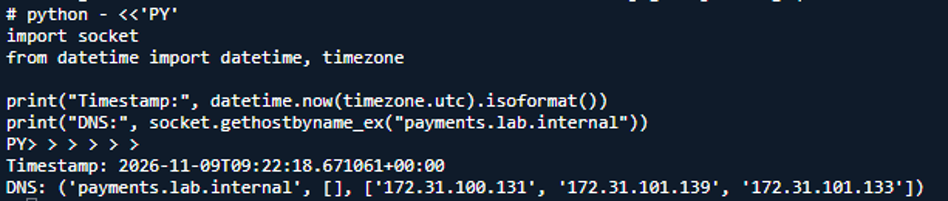
The order of those addresses could change between lookups.
Next, I sent an HTTP request directly to each Payments task.
import requests
ips = [
“172.31.101.139”,
“172.31.100.131”,
“172.31.101.133”
]
for ip in ips:
response = requests.get(
f”http://{ip}:5000/payment”,
timeout=5
)
print(ip, response.status_code)
All three tasks returned HTTP 200.
Those responses confirmed that:
- The Payments containers were listening on the expected port.
- The Orders task could reach each Payments task using private VPC networking.
- The security group configuration allowed the required traffic.
- Cloud Map was returning addresses associated with the running Payments tasks.
So far, so good: DNS resolution and direct HTTP connectivity were working.
The next test was where things got interesting.
5. Experiment Two: Does DNS Automatically Load Balance Requests?
With three Payments tasks running, I expected requests to reach all three containers.
To check, I sent 30 sequential requests to:
http://payments.lab.internal:5000/payment
The DNS lookup returned all three Payments IP addresses.
But every HTTP response came from the same task:
172.31.100.131
| Result | Observation |
| Requests | 30 |
| Successful responses | 30 |
| HTTP failures | 0 |
| Responding task | 172.31.100.131 |
| Requests served by that task | 30 |
That wasn’t what I’d expected.
DNS returned multiple addresses, yet the HTTP requests all reached one endpoint.
Why did this happen?
DNS-based service discovery and HTTP load balancing are different mechanisms.
A multivalue DNS response can provide several possible destinations, but it does not guarantee that a client will distribute requests across them.
The actual behavior depends on how the client resolves names, selects IP addresses, caches DNS results, and manages connections.
The test showed that every response came from one task. The separate DNS lookup showed that multiple addresses were available, but it didn’t tell me how the HTTP client chose an address for each request. I hadn’t isolated the client or resolver behavior behind that concentration.
The takeaway: multivalue DNS records aren’t the same thing as a dedicated load balancer.
If an application needs more controlled request distribution, health-aware routing, or advanced traffic management, it may need a different mechanism.
6. Experiment Three: What Happens When One Payments Task Fails?
Next, I wanted to see what happened when a task failed.
I started a monitoring script inside Orders that repeatedly resolved the Payments hostname and sent HTTP requests to Payments.
It recorded:
- Timestamp
- DNS response
- HTTP status
- Responding Payments IP
- Request latency
- Connection errors
With the monitor running, I deliberately stopped one Payments task.
Before the failure, requests were reaching:
172.31.100.131
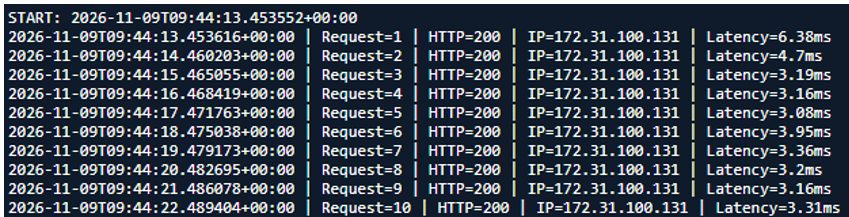
After that task was stopped, the monitor started receiving successful responses from the surviving Payments tasks.

ECS subsequently launched a replacement task, which was registered with Cloud Map under a new IP address.
What did I observe?
In the captured sample:
- 273 HTTP requests succeeded.
- No HTTP errors were recorded.
- Requests moved to surviving Payments tasks.
- The replacement task eventually started receiving requests.
The last recorded successful request to the original endpoint was at 10:05:03.894 UTC.
The next request, at 10:05:04.900 UTC, succeeded against a surviving endpoint.
The interval between these two observations was approximately 1.01 seconds.
The monitor measured the gap between sampled requests—not the duration of failover itself. It sampled roughly once per second, and I didn’t measure every internal DNS or ECS event. So the roughly one-second gap doesn’t establish that failover took exactly one second.
In the captured sample, the application continued communicating successfully while healthy Payments endpoints remained available. No HTTP errors were recorded by the monitor; this observation describes the sampled requests, not a guarantee of uninterrupted availability.
It was encouraging to see requests keep succeeding as the available endpoints changed—a useful example of how service discovery can contribute to resilience.
But that doesn’t mean every application will behave the same way.
Client-side DNS caching, connection reuse, timeouts, and retry behavior can affect what happens when a task disappears.
7. Experiment Four: What Happens When All Payments Tasks Become Unavailable?
For the final test, I went a step further.
Instead of stopping one task, I scaled Payments from three tasks to zero.
Orders stayed running, and the monitor kept sending requests.
I wanted to see what happened when the service name still existed but no application endpoints were left.
The failure sequence
At 10:20:43 UTC, I requested the scale-down.
By 10:21:09 UTC, ECS had reached a stable state with zero Payments tasks running.
At 10:21:29 UTC, Cloud Map returned no registered Payments instances.
The application logs showed that DNS resolution was failing.
Python reported:
[Errno -2] Name or service not known

HTTP requests failed with a ConnectionError caused by a NameResolutionError.
Notice where the failure happened.
Payments wasn’t returning an HTTP 500 response.
The client couldn’t resolve the Payments hostname to an address, so it couldn’t establish the connection in the first place.
Outage timeline
| Event | UTC timestamp |
| Scale-down requested | 10:20:43 |
| Last successful HTTP request | 10:21:00.920 |
| First failed request | 10:21:01.937 |
| ECS stable at zero tasks | 10:21:09 |
| Cloud Map confirmed empty | 10:21:29 |
| First successful request after restoration | 10:24:02.608 |
The first observed failure occurred about 18 seconds after the scale-down request.
That’s what the application observed; it isn’t an exact measure of task shutdown or DNS deregistration.
Restoring the service
I then set the Payments desired count back to three.
ECS launched new Payments tasks, and Cloud Map registered their new private IP addresses:
| New Payments task | Private IP |
| Task 1 | 172.31.100.158 |
| Task 2 | 172.31.101.11 |
| Task 3 | 172.31.101.205 |
Eventually, the Orders monitor resolved all three addresses and successfully called Payments again.
The first successful recovery request was recorded at 10:24:02.608 UTC.
The timeline doesn’t include when I requested restoration. Without that timestamp, I can’t separate the time Payments was deliberately held at zero tasks from the time between requesting restoration and seeing the first successful response.
Final measurements
| Metric | Result |
| Total monitored requests | 369 |
| Successful requests | 189 |
| Failed requests | 180 |
| First failure to first recovery | 180.67 seconds |
The 180.67 seconds is the observed gap between the first failed HTTP request and the first successful request after recovery.
It includes the time Payments was deliberately kept scaled to zero.
It isn’t a measure of ECS task startup time, Cloud Map DNS propagation time, or an AWS service recovery SLA.
The limit is straightforward:
Service discovery cannot make a service available when no healthy application instances exist.
8. What These Experiments Taught Me
Here’s what I took away from the lab.
Service discovery is not load balancing
Cloud Map allows applications to discover service endpoints using DNS.
It does not guarantee that requests will be evenly distributed across those endpoints.
The 30-request experiment made that clear.
DNS is part of application behavior
DNS isn’t just a networking detail developers can ignore.
The application’s libraries, DNS caching, connection handling, and retry logic all influence how it responds when its environment changes.
A single task failure is different from a complete service outage
When one Payments task failed, the others kept serving requests.
When I removed every Payments task, Orders could no longer resolve the hostname, and HTTP communication failed.
Losing a task and losing a whole service are very different problems.
ECS desired count helps maintain capacity
When I stopped a task with the Payments desired count still set to three, ECS launched a replacement.
When I set the desired count to zero, ECS maintained zero tasks.
In both cases, ECS did exactly what the configuration asked it to do.
Monitoring needs to capture more than HTTP status codes
Logging DNS responses alongside HTTP results made it much easier to see where things went wrong.
Without those DNS results, I’d have known only that Orders couldn’t reach Payments.
With them, I could see that name resolution was failing.
For production, the lesson is to look beyond HTTP status codes and use application logs, metrics, tracing, and network-level visibility together.
9. Production Design Considerations
This was a deliberately simple lab. In production, I’d want more safeguards.
Run multiple tasks across Availability Zones. Multiple task replicas reduce dependence on a single container, while distributing them across Availability Zones can improve resilience against infrastructure failures.
Use appropriate health checks. An application process may be running without being ready to serve traffic. Health checks help distinguish task existence from application readiness.
Implement bounded retries and backoff. Temporary DNS or connection failures may recover, but uncontrolled retries can increase pressure on a struggling service. Use timeouts, exponential backoff, and jitter.
Consider circuit breakers. When a downstream dependency becomes unavailable, a circuit breaker can prevent repeated calls from consuming resources unnecessarily.
Choose the right service-to-service connectivity mechanism. Cloud Map DNS discovery is useful for simple private service discovery. Other ECS connectivity options, including ECS Service Connect, can provide additional capabilities for service-to-service communication.
Monitor both application and infrastructure signals. ECS running task counts, Cloud Map registrations, DNS errors, HTTP error rates, latency, and application readiness provide different views of service health.
Above all, test what happens when things fail. Multiple replicas are useful, but they don’t automatically make an application resilient.
Conclusion
Before this lab, ECS service discovery sounded straightforward to me: create a Cloud Map namespace, register the service, and use its DNS name.
The experiments showed me how much sits behind that setup.
Each layer has a different job. ECS manages task placement and desired capacity. Fargate provides task networking through elastic network interfaces. Cloud Map keeps the service endpoints discoverable, and DNS resolvers return their addresses. The application then decides how to connect, retry, or respond to a failure.
Knowing where one layer’s responsibility ends and the next begins makes it easier to reason about reliable microservices.
In this lab, stopping one task caused no observed HTTP errors. Removing every Payments task was a different story: DNS resolution and connections failed until the service was restored.
My biggest takeaway? Service discovery alone doesn’t make microservices communication reliable. Networking, service health, client behavior, and application resilience all have to work together.
Leave a Reply